
Do You Really Need a Headless CMS? 7 Signs It's Time to Switch
Technology Knowledge
As businesses grow, their digital ecosystems rarely stay simple. New markets demand localized experiences, websites multiply, and tools need to communicate seamlessly. A headless CMS can bring structure to this complexity by making content more reusable and delivery more flexible. The real value, however, isn't adopting new technology. It's creating a digital foundation that grows with your changing business needs.
Your website may have started as a simple digital presence: a few pages about your business, a blog, and a contact form. But as your business grows, so do your digital needs.
You might be managing content across multiple websites, expanding into new markets, or integrating your website with more business systems. Suddenly, tasks that used to be straightforward become time-consuming and complicated.
This is where Headless CMS often enters the conversation.
But is it really the right solution for your business? And how do you know when it's time to move beyond your existing content management system?
Let's break down what a Headless CMS actually is, how it works, and seven signs that it might be worth considering.
1What Is a Headless CMS?
Before diving into the signs, let's start with the basics.
1.1. First, What Is a CMS?
A Content Management System (CMS) is software that allows you to create, organize, edit, and publish digital content without building everything from scratch.
WordPress is a familiar example. It provides an interface for managing your content, along with themes and templates that determine how your website looks.
In a traditional CMS, content management and website presentation are typically closely connected. This works well for many websites, especially when content is primarily published to one destination.
1.2. So, What Makes a CMS "Headless"?
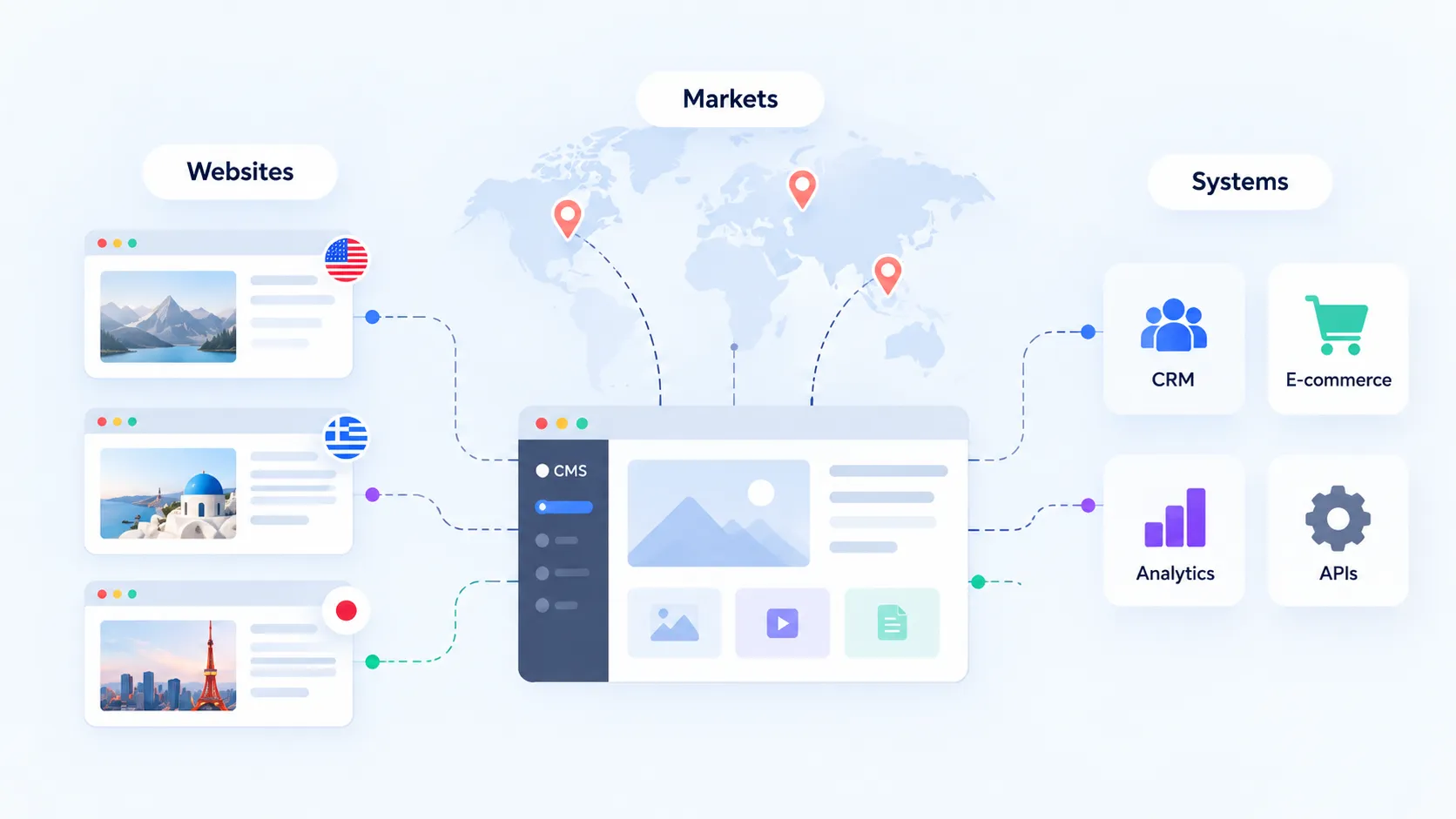
A Headless CMS separates content management from the presentation layer, allowing the same content to be delivered to different websites, applications, and digital experiences.
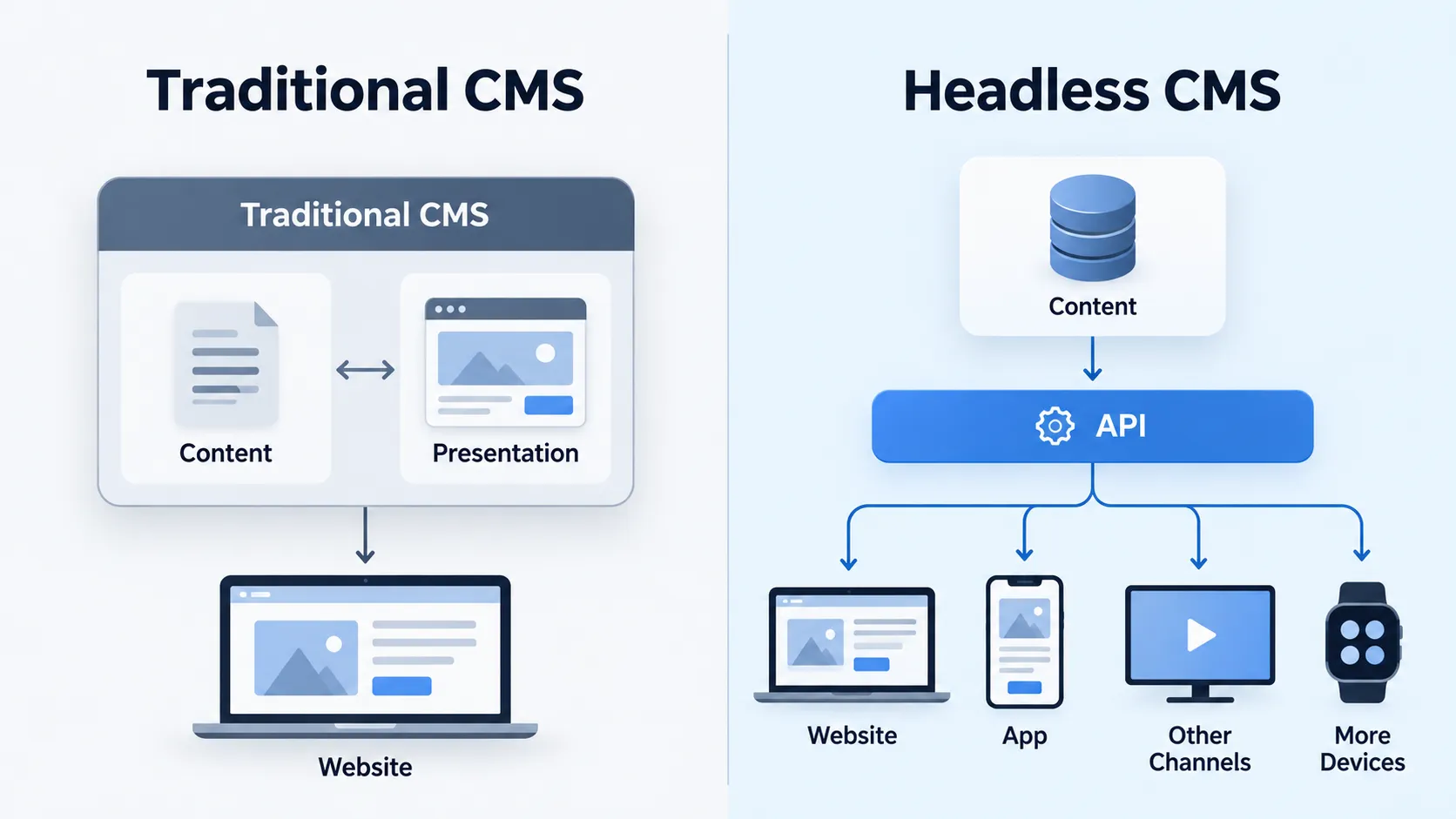
Think of it this way:
- Traditional CMS: You manage content and display it through a website system that is closely integrated with the CMS.
- Headless CMS: You manage content in one place, while separate applications retrieve and display it through APIs.
An API (Application Programming Interface) is simply a way for different software systems to communicate.
Imagine a retail business with a website and a mobile app.
With a Headless CMS, its team can manage product descriptions, brand stories, and promotional content in a central system. Both the website and app can retrieve that content while presenting it differently for their respective users.
The result is greater flexibility in how content is structured, managed, and delivered.
As explained in AWS's overview of Headless CMS, this architecture typically consists of three components: a content repository, APIs, and frontend applications.
However, greater flexibility also means taking more responsibility for how those components are developed and maintained.
So, when does that trade-off start making sense?
27 Signs It Might Be Time to Switch to a Headless CMS
2.1. You're Managing Content Across Multiple Digital Channels
Your website is no longer the only place where customers interact with your business.
You might have a mobile app, customer portal, regional websites, or other digital touchpoints, each requiring access to similar content.
When these channels operate independently, maintaining consistent information can become difficult.
A Headless CMS makes it possible to manage content centrally and distribute it to multiple applications through APIs.
For example, a hospitality brand could maintain property descriptions, amenities, and destination information in one content repository while displaying them across its website, booking app, and guest portal.
Each channel can deliver a different experience without requiring a completely separate content management process.
The question to ask: Are you managing the same information across several digital platforms that could benefit from a shared content source?
2.2. Your Team Keeps Duplicating the Same Content
Content duplication is more than a minor inconvenience.
When information is repeatedly copied between pages, websites, or systems, every update creates another opportunity for inconsistencies.
A service description changes, but one regional website still displays the previous version. A product specification gets updated in one location but remains outdated elsewhere.
Headless CMS platforms often support structured content, where information is organized into reusable content types and fields rather than being locked into individual pages.
Instead of recreating the same information repeatedly, teams can reference shared content entries wherever appropriate.
This can improve content consistency and reduce repetitive editorial work, particularly as content libraries become more complex.
However, the benefits depend on thoughtful content modeling. Simply adopting a Headless CMS won't automatically fix a poorly organized content structure.
The question to ask: How much time does your team spend copying, updating, or checking information across different locations?
2.3. Your Current CMS Is Limiting Design and Development Flexibility
Your brand experience shouldn't always have to fit the limitations of a template.
As digital experiences become more sophisticated, businesses may want interactive interfaces, custom user journeys, or frontend technologies that are difficult to accommodate within their existing CMS setup.
Headless architecture allows developers to build the presentation layer separately from the system managing content.
This gives teams greater freedom to choose frontend frameworks, develop custom interfaces, and evolve the user experience without necessarily replacing the underlying content repository.
For businesses investing in distinctive digital experiences, that flexibility can be valuable.
Still, it's important to identify whether the limitation comes from the CMS itself or simply from how the current website was originally built.
Sometimes, improving the existing implementation may be enough.
The question to ask: Is your team making compromises to fit the current CMS instead of building the experience your customers need?
2.4. You're Expanding Into Multiple Markets or Managing Multiple Brands
Growth often introduces new layers of complexity.
A business operating across different countries might need localized content, market-specific campaigns, multiple languages, and different publishing responsibilities.
Similarly, a company managing several brands may want to share certain information while maintaining distinct experiences for each brand.
A Headless CMS can support this approach through structured content, localization features, and centralized content governance.
For example, a company operating in Singapore, Japan, and Australia could reuse global brand content while adapting selected information for each market.
Rather than maintaining completely separate content systems, teams can establish a more coordinated approach.
Of course, multi-language content management is only part of international expansion. Localized URLs, search indexing, and regional SEO requirements still need to be implemented correctly.
The question to ask: Is your current CMS becoming harder to manage as your business expands across brands, languages, or markets?
2.5. Your Website Needs to Connect With More Business Systems
A modern website rarely operates in isolation.
It might need to communicate with a CRM, eCommerce platform, product information management system, marketing automation tools, or internal business applications.
As the number of integrations grows, tightly connected systems can become harder to modify and maintain.
An API-first Headless CMS can fit into a more modular digital architecture, allowing content management to operate alongside specialized business platforms.
For instance, product specifications might come from a PIM system, customer information from a CRM, and editorial content from a CMS.
Each system has a defined responsibility, while the digital experience brings the relevant information together.
However, adopting a Headless CMS doesn't eliminate integration work. APIs, data synchronization, security, and reliability still require proper engineering.
The question to ask: Are limitations in your current CMS making integrations more complicated than they need to be?
2.6. Content Updates and Frontend Development Are Slowing Each Other Down
Marketing teams need the flexibility to publish and update content. Development teams need to improve functionality, performance, and user experiences.
When these workflows are unnecessarily dependent on each other, progress can slow down.
With a well-designed Headless CMS architecture, content management and frontend development can evolve more independently.
Editors can work within established content structures, while developers maintain and deploy frontend applications separately.
This separation can be particularly useful for organizations managing several digital products or frequent frontend releases.
But editorial experience still matters.
Features such as visual previews, scheduling, approval workflows, and content staging should be assessed before choosing a platform. Some Headless CMS solutions, including Storyblok, support visual editing experiences.
The question to ask: Do content and development workflows regularly create bottlenecks that prevent your team from moving efficiently?
2.7. Your Existing Architecture Is Holding Back Performance or SEO Improvements
Website performance and search visibility are essential to digital growth.
However, as websites evolve, older implementations can make technical improvements increasingly difficult.
You might struggle to implement better caching, modern rendering strategies, or meaningful frontend optimizations without making significant changes to your existing system.
Headless architecture offers flexibility in choosing how a website is built and rendered.
Developers can select approaches such as server-side rendering (SSR) or static site generation (SSG), depending on the project's requirements.
But there's an important distinction:
A Headless CMS does not automatically make a website faster or improve its search rankings.
Performance depends on frontend architecture, hosting, content delivery, caching, and overall implementation quality.
Similarly, technical SEO still requires proper rendering, metadata, crawlable links, and indexable content.
Google's JavaScript SEO documentation explains why rendering strategies matter for search engines.
Before considering a migration, businesses should identify whether their performance and SEO challenges genuinely stem from architectural limitations.
The question to ask: Is your existing system preventing meaningful technical improvements, even after reasonable optimization efforts?
3Headless CMS vs Traditional CMS: Which Fits Your Business?
Understanding the benefits is one thing. Choosing the right approach is another.
There is no universally superior CMS architecture. Different businesses have different requirements, teams, and budgets.
Business requirement · Traditional CMS · Headless CMS
Simple company website · Often a good fit · May add complexity
Multiple content delivery channels · Depends on the platform · Strong architectural fit
Highly customized frontend · Possible, depending on CMS · Greater independence
Built-in website editing · Often available · Depends on the solution
Multiple digital applications · Possible with integrations · Designed for independent frontends
Ongoing technical maintenance · Often simpler · Requires more coordination
A hybrid CMS can also provide a middle ground, combining integrated editing capabilities with API-based content delivery.
The decision should ultimately reflect your business requirements rather than a preference for any particular technology.
4What Should You Consider Before Switching?
Migrating to a Headless CMS is more than replacing a content editor. It can involve rethinking how your content, frontend applications, and integrations work together.
Before committing, consider four areas.
1. Business objectives
Identify the specific problems you want to solve. Are you improving content operations, enabling new digital products, or reducing limitations in your current architecture?
2. Technical resources
A separate frontend introduces additional development, deployment, monitoring, and maintenance responsibilities. Make sure your team or technology partner can support them.
3. Total cost of ownership
Consider implementation, content migration, CMS licensing or hosting, integrations, ongoing maintenance, and future upgrades—not just the initial project cost.
4. Migration and SEO risks
Existing URLs, content relationships, metadata, redirects, and internal links need careful attention.
If URLs change during migration, Google's site migration guidance recommends URL mapping, appropriate redirects, and ongoing monitoring. Temporary search ranking fluctuations are possible.
A clear migration strategy is essential for protecting the value of your existing website.
5A Quick Checklist: Is Your Business Ready for Headless CMS?
Consider the following questions:
- Do you publish content across multiple digital platforms?
- Does your team frequently duplicate or manually synchronize content?
- Is your current CMS restricting important frontend improvements?
- Are you expanding across brands, languages, or markets?
- Do you need more sophisticated integrations?
- Are content and development workflows creating unnecessary delays?
- Is your current architecture limiting performance or technical SEO improvements?
If several of these challenges sound familiar, a Headless CMS may deserve a closer look.
That doesn't necessarily mean an immediate migration. The next step is to evaluate your current architecture, confirm the business requirements, and compare potential solutions.
6Final Thoughts: Build Around Your Business, Not the Technology Trend
A Headless CMS can offer meaningful advantages for organizations managing increasingly complex digital experiences.
It can support reusable content, independent frontend development, and more flexible delivery across digital channels.
But the decision to switch should start with your business—not the technology.
The goal isn't simply to adopt a more modern architecture. It's to build a digital platform that supports your teams, serves your customers, and continues to evolve as your business grows.
Not sure whether your existing CMS can support your next stage of growth?
At RoseRebel, we bring together strategy, design, and technology to help businesses evaluate and build digital experiences around their real needs.
_dD7Vv.webp)
_ptMeO.webp)
_2sBPFD.webp)